Relation Database Services
Day-7: AWS Assignment
1. What is RDS? What are the database engine options available in RDS?
Amazon Relational Database Service (Amazon RDS) is a collection of managed services that makes it simple to set up, operate, and scale databases in the cloud.
Engine Options — Amazon Aurora with MySQL compatibility, Amazon Aurora with PostgreSQL compatibility, MySQL, MariaDB, PostgreSQL, Oracle, and SQL Server.
2. What is multi-AZ RDS?
Multi-AZ RDS is a feature in Amazon RDS that provides enhanced availability for database instances within a single AWS Region. In a Multi-AZ deployment, Amazon RDS automatically provisions and maintains a synchronous standby replica in a different Availability Zone.
3. What are the types of backups in the RDS database?
Amazon RDS Backup and Restore:
Automated Backups.
Point-in-time Restores.
Database Snapshots.
Snapshot Copies.
Snapshot Sharing.
4. Is it possible to stop a RDS instance, how can I do that?
Yes, it's possible to stop a RDS instance, we can stop a database instance for up to 7 days at a time. After 7 days, it will be automatically started.
In the navigation pane, choose Databases, and then choose the DB instance that you want to stop. For Actions, choose Stop temporarily. In the Stop DB instance temporarily window, select the acknowledgment that the DB instance will restart automatically after 7 days.
5. What is meant by parameter groups and Option groups in RDS? What is the use of it?
Amazon RDS uses option groups to enable and configure additional features. An option group can specify features, called options, that are available for a particular Amazon RDS DB instance. When you associate a DB instance with an option group, the specified options and option settings are enabled for that DB instance. An option group on a form or report displays a limited set of alternatives. An option group makes selecting a value easy because you can choose the value that you want. Only one option in an option group can be selected at a time.
A parameter group is a collection of engine configuration values that you set for your RDS database instance. It contains the mapping of what you want each of these over 400 unique parameters to be set to. For AWS RDS instances, you manage your database engine configuration through the use of parameters in a DB parameter group. DB parameter groups act as a container for engine configuration values that are applied to one or more DB instances.
6. What is the difference between SQL and NoSQL databases? Give an example for both types.
| SQL | NoSQL |
| RELATIONAL DATABASE MANAGEMENT SYSTEM (RDBMS) | Non-relational or distributed database system. |
| These databases have fixed, static or predefined schema | They have a dynamic schema |
| These databases are not suited for hierarchical data storage. | These databases are best suited for hierarchical data storage. |
| These databases are best suited for complex queries | These databases are not so good for complex queries |
| Vertically Scalable | Horizontally scalable |
| Follows ACID property | Follows CAP(consistency, availability, partition tolerance) |
| Examples: MySQL, PostgreSQL, Oracle, MS-SQL Server, etc | Examples: MongoDB, HBase, Neo4j, Cassandra, etc |
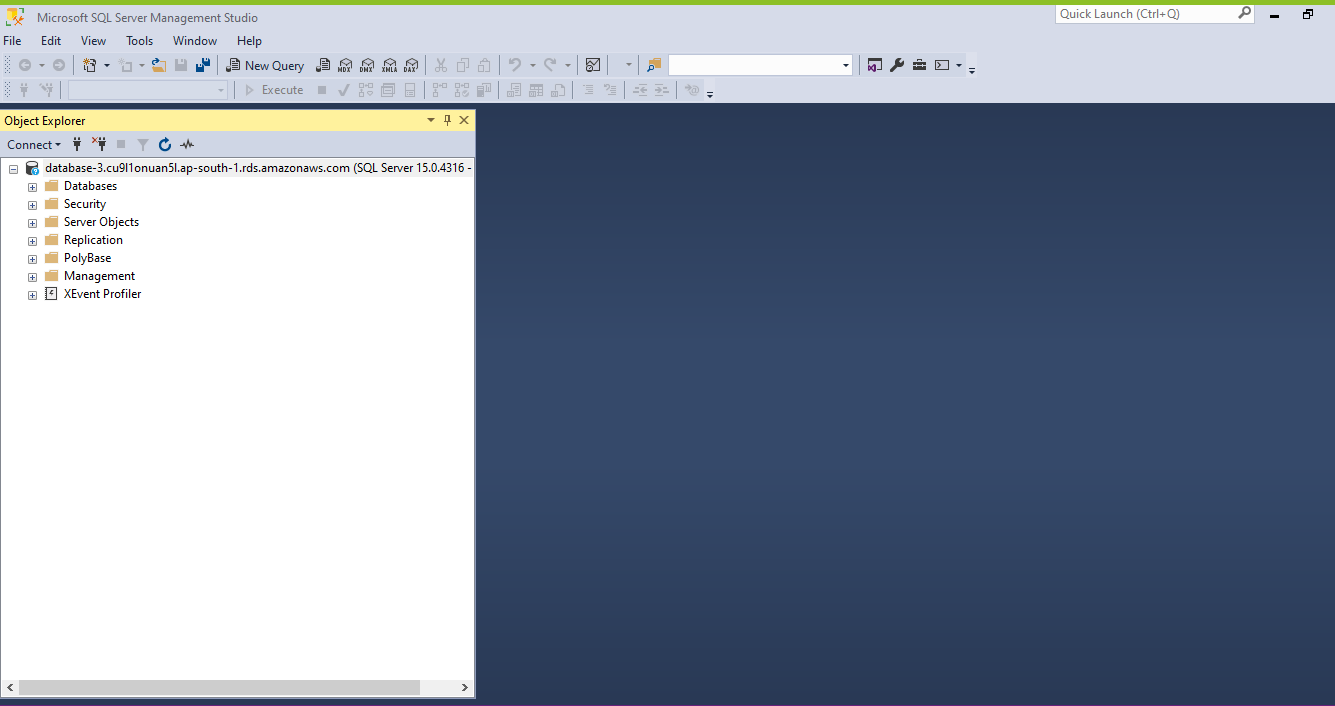
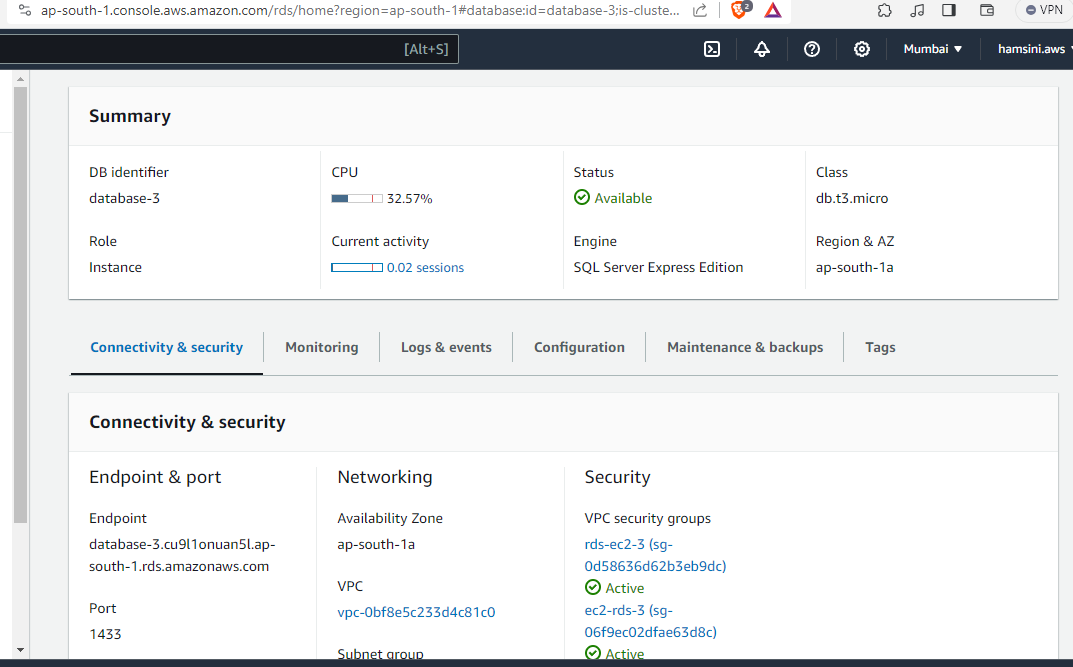
7. Create an RDS MS-SQL instance and connect to the instance using SQL Server Management Studio.
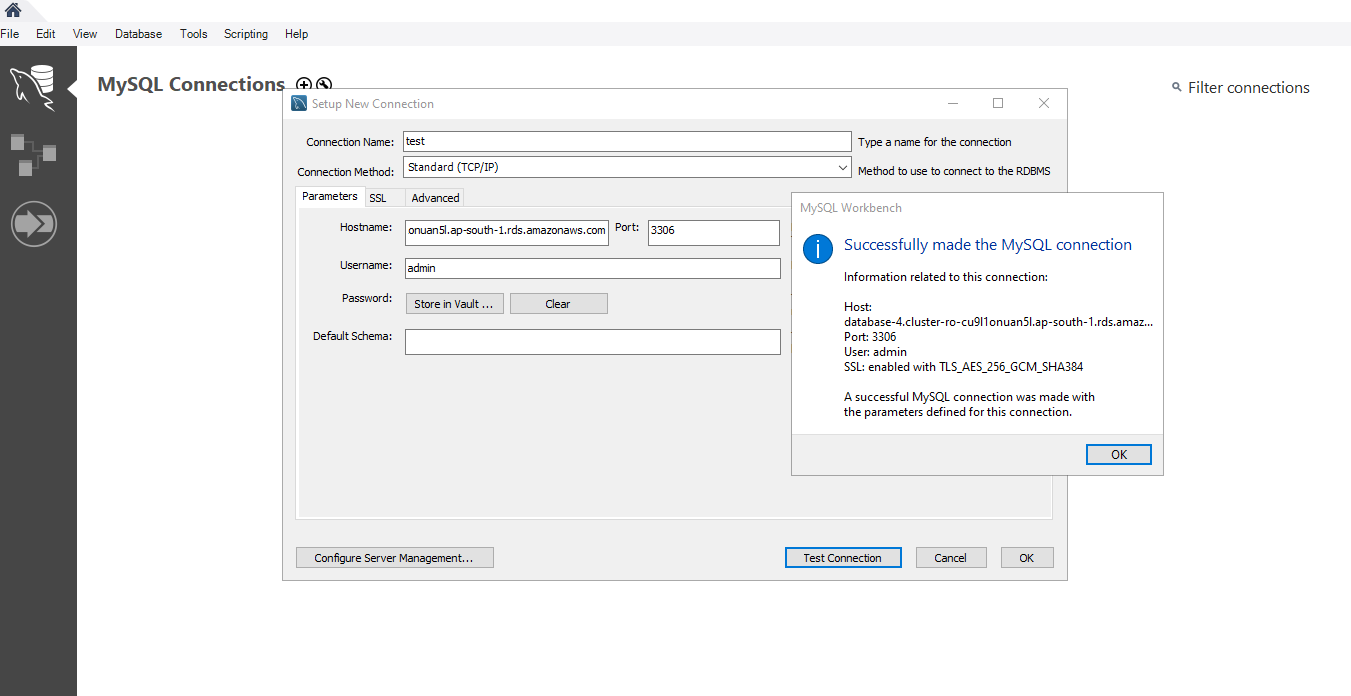
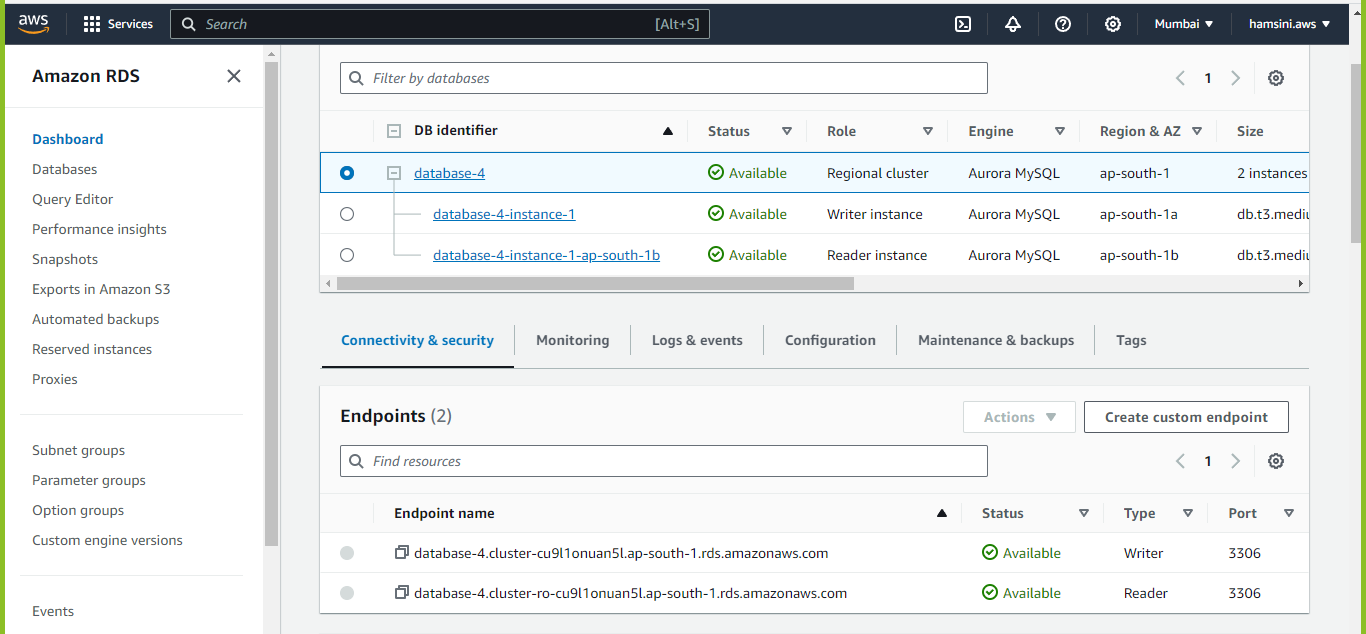
8. Create an Aurora MySQL instance and connect to the instance using SQL workbench.
9. Create a DynamoDB table and check how the pricing works for DynamoDB.
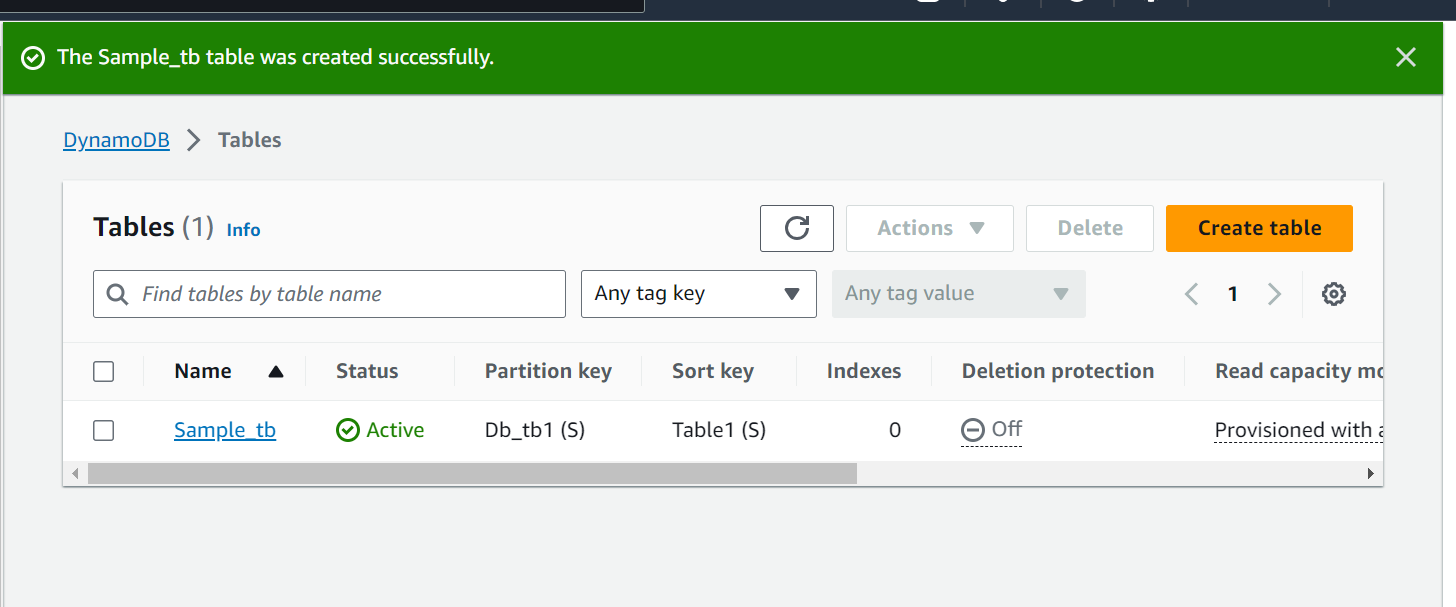
DynamoDB pricing can be complex, but here are the key factors that contribute to the cost:
Provisioned Capacity Costs: If you choose provisioned capacity, you'll be billed based on the number of RCUs and WCUs you provision. AWS charges you separately for reads and writes. The pricing may vary by region, and there are cost-saving options like auto-scaling.
On-Demand Capacity Costs: If you choose on-demand capacity, you'll be billed based on the actual usage of reads and writes. On-demand pricing tends to be more expensive per unit of capacity but can be cost-effective for variable workloads.
Data Storage Costs: You'll be charged for the amount of data stored in your DynamoDB tables. This includes the size of your items, local and global secondary indexes, and any backups you retain.
Data Transfer Costs: Data transfer costs may apply if your DynamoDB table is in a Virtual Private Cloud (VPC) and you transfer data in and out of the VPC.
Backup and Restore Costs: DynamoDB provides automated backups, and you may incur costs for backup storage and data restore operations.
Global Secondary Index Costs: If you create global secondary indexes (GSI), there may be additional costs based on the provisioned capacity and storage associated with GSIs.
10. What are the other Database type options available in AWS other than RDS and DynamoDB? Describe each of these.
There are 15 purpose-built database options available in AWS(including RDS and DynamoDB):
Amazon Aurora
Amazon RDS
Amazon Redshift
Amazon DynamoDB
Amazon ElastiCache
Amazon MemoryDB for Redis
Amazon DocumentDB (with MongoDB compatibility)
Amazon Keyspaces (for Apache Cassandra)
Amazon Neptune
Amazon Timestream
Amazon Quantum Ledger Database (QLDB)
AWS Database Migration Service (DMS)
Other Types of Databases:
There are various other widely used databases in addition to the two primary types, which are as follows:
Hierarchical Databases:
A hierarchical database is a type of database that uses a hierarchical model to organize data. In a hierarchical database, data is organized into a tree-like structure, with each record represented as a node in the tree. Each node is connected to one or more child nodes, and each child node can have its own set of child nodes, creating a hierarchy of nodes.
In a hierarchical database, each node in the hierarchy can have only one parent node, and the relationship between nodes is one-to-many. This means that a parent node can have multiple child nodes, but a child node can only have one parent node.
Network Database:
A network database uses a network model to organize data. In a network database, data is organized into a series of interconnected records, with each record representing an entity and the relationships between the entities represented as lines connecting the records.
Each record in this type of database can have multiple parent and child records, creating a complex web of relationships between the data. This allows for a more flexible and expressive data model than hierarchical databases, which have a more rigid one-to-many relationship between parent and child nodes.
Object-Oriented Databases:
In an object-oriented database, data is organized into objects, which are self-contained entities that contain both data and the methods that operate on that data. Object-oriented databases are designed to support the creation and management of complex data structures, and they are often used in applications that require the manipulation of large amounts of structured and semi-structured data.
Relational Databases:
These are the most widely used types of databases, and they store data in tables that are related to each other through common keys or indexes. Examples of relational databases include MySQL, Oracle, and Microsoft SQL Server.
NoSQL Databases:
These databases are designed to handle large amounts of unstructured or semi-structured data, and they do not use the traditional table-based relational database model. Instead, they use a variety of data models, such as key-value pairs, documents, and graphs, to store data. Examples of NoSQL databases include MongoDB, Cassandra, and Couchbase.
Centralized Database:
A centralized database is a database that is stored on a central server and can be accessed by multiple users over a network. The central server acts as a hub for the database, and all users access the same copy of the database. This database is commonly used in organizations to store and manage data that is shared by multiple users or departments.
Distributed Database:
A distributed database is stored and managed across multiple servers, rather than on a single central server. It is designed to provide faster access to data and to improve the scalability and reliability of the database. In a distributed database, data is divided into smaller chunks and stored on multiple servers, with each server responsible for storing and managing a portion of the data.
Cloud Database:
A cloud database is stored and managed on a cloud computing platform, rather than on a local server or device. Cloud databases are accessed over the internet and can be used by multiple users or applications, providing a flexible and scalable way to store and manage data. Cloud databases can be used for a wide range of applications, including web and mobile applications, data warehousing, and more.
Personal Database:
A personal database is designed to store and manage data for a single individual or small group of users. They are typically smaller in scale and scope than enterprise databases, which are used by larger organizations to store and manage data for a large number of users. You can use personal databases to store and manage a wide range of data, including financial records, contact information, personal notes, and more.
Operational Database
An operational database is used to store and manage data that is needed to support the day-to-day operations of an organization. Operational databases are typically designed to handle a high volume of transactions and are used to store data that is needed in real time, such as customer orders, inventory levels, and financial transactions. They are often used in applications that require fast access to data and the ability to update the data in real time.
Enterprise Database:
An enterprise database is used by a large organization to store and manage data that is needed to support the organization's operations and business processes. Enterprise databases are designed to handle a high volume of transactions and to support a large number of users.
End-User Database:
Used by non-technical users, such as business professionals or individual consumers, an end-to-end database helps store and manage data. They are typically designed to be easy to use and do not require extensive technical knowledge or expertise to set up and maintain.
Commercial Database:
A commercial database is developed and sold by a company for use by customers. They are typically more feature-rich and robust than free or open-source databases, and they may be used in a wide range of applications, including business, government, and education. Often provided as a service, the database is hosted and managed by the company and accessed by customers over the Internet.
Graph Database:
A graph database is a type of NoSQL database that uses graph theory to store, manage, and query data. In a graph database, data is organized into nodes, which represent entities or objects, and edges, which represent the relationships between the nodes. They are particularly well-suited for storing and managing data that has complex relationships and connections, such as social networks, recommendation engines, and fraud detection systems.
Open-Source Databases:
Open-source databases are available for free and can be used, modified, and distributed by anyone. Open-source databases are developed and maintained by a community of volunteers, and users are free to access and modify the source code as needed.
11. What is ElasticCache. Why is it used?
Amazon ElastiCache is a web service that makes it easy to set up, manage, and scale a distributed in-memory data store or cache environment in the cloud. It provides a high-performance, scalable, and cost-effective caching solution. ElastiCache eliminates the difficulty of establishing and operating a distributed cache system. It can boost web application performance by allowing you to obtain data from a fast, controlled in-memory cache rather than relying completely on the slower disk-based database.
12. Which engines does Amazon ElastiCache support?
Amazon ElastiCache supports two major open-source in-memory caching engines: Memcached and Redis. ElastiCache users typically select between the two caching engines, depending on the design of the corresponding application. Memcached is a general-purpose distributed memory caching system for Linux, OS X and Windows.
Redis: ElastiCache supports the popular open-source in-memory data store Redis. Redis is known for its high performance, data structures, and support for advanced caching use cases.
Memcached: ElastiCache also supports Memcached, which is another open-source, high-performance, in-memory caching system. Memcached is often used for simple caching needs.