Terraform
Module-2_Terraform_Assignment
Terraform and its usage
Define Iac. List different types of Iac tools and Advantages of Iac
"IaC" stands for Infrastructure as Code. It is a method of managing and provisioning infrastructure using code and automation, rather than manually configuring servers, networks, and other infrastructure components. IaC allows you to define and describe your infrastructure in a code format, which can be version-controlled, tested, and deployed like any other software application. This approach provides several advantages, including repeatability, consistency, and scalability in managing infrastructure.
There are various tools and technologies available for implementing IaC. Some popular IaC tools include:
Terraform: Terraform is an open-source infrastructure automation tool by HashiCorp. It uses a declarative language to define infrastructure as code and can work with various cloud providers and on-premises environments.
Ansible: Ansible is an open-source automation tool that can be used for configuration management and IaC. It uses YAML-based playbooks to define infrastructure and application configurations.
Chef: Chef is an automation platform that uses a domain-specific language (DSL) to define infrastructure as code. It is particularly well-suited for managing configurations on servers.
Puppet: Puppet is another configuration management tool that can be used for IaC. It uses a declarative language to define system configurations.
AWS CloudFormation: This service is specific to Amazon Web Services (AWS) and allows you to define and provision infrastructure resources using JSON or YAML templates.
Google Cloud Deployment Manager: Similar to AWS CloudFormation, this tool is used for defining and deploying infrastructure on Google Cloud Platform (GCP) using templates.
Azure Resource Manager (ARM) Templates: ARM templates allow you to define and deploy Azure infrastructure resources as code on Microsoft Azure.
OpenStack Heat: This tool is used for defining and orchestrating infrastructure resources in an OpenStack cloud environment.
Docker Compose: While Docker Compose is more focused on container orchestration, it can be used for defining the infrastructure required to run containerized applications.
Advantages of IaC:
Scalability: IaC allows you to easily scale your infrastructure up or down to meet changing demands by modifying code, rather than manually configuring resources.
Consistency: IaC ensures that infrastructure configurations are consistent across different environments, reducing the risk of configuration drift and associated errors.
Version Control: Infrastructure code can be versioned using tools like Git, enabling better tracking, collaboration, and rollback capabilities.
Automation: IaC automates provisioning and management tasks, reducing the need for manual intervention and saving time and effort.
Reusability: Code-based infrastructure definitions can be reused across projects and environments, promoting consistency and reducing duplication.
Testing: IaC allows for testing infrastructure changes in a controlled manner before applying them in production, enhancing reliability.
Documentation: Infrastructure code serves as documentation, making it easier to understand and replicate the setup.
Disaster Recovery: In the event of a disaster, IaC allows for rapid recreation of the entire infrastructure from code, improving disaster recovery capabilities.
Compliance: IaC can help ensure that infrastructure configurations adhere to security and compliance policies by design.
Cost Control: IaC can help optimize resource usage and reduce costs by automating the provisioning and decommissioning of resources as needed.
Define Terraform. What are its advantages? Also list and understand other tools offered by Hashicorp.
Terraform is an open-source Infrastructure as Code (IaC) tool developed by HashiCorp. It is designed to help you define, provision, and manage infrastructure and services across various cloud providers, on-premises data centers, and third-party services using a declarative configuration language. Terraform allows you to create infrastructure code that describes the desired state of your infrastructure, and it can then automatically manage the resources needed to achieve that state.
Advantages of Terraform:
Multi-Cloud Support: Terraform supports a wide range of cloud providers, including AWS, Azure, Google Cloud, and more, as well as on-premises and other third-party services. This makes it a versatile choice for managing infrastructure in heterogeneous environments.
Declarative Syntax: Terraform uses a declarative syntax, which means you describe what you want the infrastructure to look like rather than specifying the steps to get there. This makes the configuration more concise and easier to understand.
Infrastructure as Code: Terraform treats infrastructure as code, which can be version-controlled, tested, and shared, improving collaboration and reducing manual configuration errors.
Dependency Resolution: Terraform automatically resolves and manages resource dependencies, ensuring that resources are created or updated in the correct order.
State Management: Terraform maintains a state file that keeps track of the actual state of your infrastructure. This helps Terraform understand what changes are needed to bring the infrastructure in line with the desired state.
Modularity: Terraform allows you to create reusable modules, making it easier to manage and share infrastructure configurations across different projects.
Ecosystem: Terraform has a rich ecosystem of providers and modules created by the community, which extends its functionality and enables you to manage a wide range of resources and services.
Other tools offered by HashiCorp:
Vault: HashiCorp Vault is a tool for managing secrets and protecting sensitive data. It provides a secure way to store, access, and distribute credentials, encryption keys, and other secrets used in your applications and infrastructure.
Consul: HashiCorp Consul is a service mesh and service discovery tool. It helps you discover, connect, and secure services in your network, providing a unified way to manage and connect microservices.
Nomad: HashiCorp Nomad is an orchestration and scheduling tool for containers and non-containerized applications. It allows you to manage the deployment and scaling of your workloads.
Packer: HashiCorp Packer is a tool for creating machine images for various platforms (e.g., VMs, containers). It automates the process of building consistent and reproducible images for use in different environments.
Boundary: HashiCorp Boundary is a secure remote access management tool. It helps you control and secure access to your infrastructure and applications, providing a Zero Trust approach to access control.
HashiCorp provides a suite of tools that are often used together in the DevOps and infrastructure management space to address various aspects of infrastructure provisioning, security, and management, making it easier to build and maintain modern, cloud-native applications and services.
Define Terraform backend. Explain the difference between local backend and s3 backend. Understand Terraform Cloud.
In Terraform, the "backend" refers to the mechanism that handles the storage, retrieval, and management of Terraform state files. The Terraform state file is a critical component as it keeps track of the current state of the infrastructure, the resources that Terraform manages, and their configurations. Using different backends allows you to choose how and where you store the state file, depending on your needs and requirements.
Here, I'll explain the difference between a "local backend" and an "S3 backend," as well as introduce Terraform Cloud.
Local Backend:
A local backend is the default backend used when no explicit backend configuration is provided. In this setup, the Terraform state file is stored on the local filesystem of the machine where Terraform commands are executed.
While it's easy to get started with a local backend, it has limitations, such as difficulty in sharing state files, lack of locking to prevent concurrent access, and potential data loss if the state file is not properly managed and backed up.
Local backends are more suitable for single-user or single-machine development environments, where collaboration and locking are not critical.
S3 Backend:
An S3 (Amazon Simple Storage Service) backend is a remote backend where the Terraform state file is stored in an S3 bucket on AWS. It offers a scalable, shared, and secure solution for managing the state file.
S3 backends provide benefits such as the ability to collaborate with multiple users, maintain a centralized state file, apply locking to prevent concurrent state modifications, and ensure durability and availability of the state data.
S3 backends are a good choice for team environments and production infrastructure to ensure data consistency and prevent data loss.
Terraform Cloud:
Terraform Cloud is a remote service offered by HashiCorp that serves as a managed backend for Terraform state files. It provides several benefits, such as remote collaboration, automation, and additional features for managing infrastructure.
Key features of Terraform Cloud include a centralized and secure state storage, role-based access control (RBAC), collaborative workspace management, integration with version control systems, and support for remote plan and apply operations.
Terraform Cloud simplifies team collaboration, ensures access control, and integrates seamlessly with popular version control platforms like GitHub and GitLab.
In summary, Terraform backends are used to manage Terraform state files, and the choice of backend depends on your requirements. For small, single-user setups, a local backend may suffice. However, for team collaboration, production environments, and data durability, remote backends like S3 or Terraform Cloud are more appropriate. Terraform Cloud, in particular, offers a comprehensive solution for managing Terraform workspaces and state files securely and collaboratively.
List any 5 terraform commands (init, plan, apply, validate, fmt, destroy, show, state). Explain its usage with examples.
terraform init:
Usage: Initializes a working directory with Terraform configuration files and downloads the required provider plugins.
Example: terraform init
terraform plan:
Usage: Generates an execution plan that shows what Terraform will do before making any actual changes to your infrastructure. It provides an overview of the proposed changes.
Example: terraform plan
terraform apply:
Usage: Applies the changes described in the execution plan generated by terraform plan and creates or updates the infrastructure accordingly.
Example: terraform apply
terraform validate:
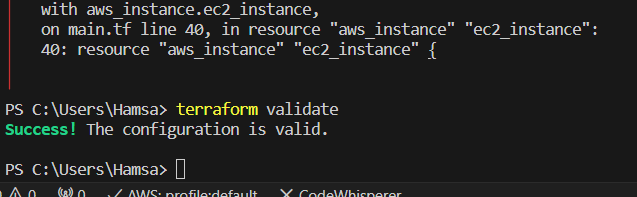
Usage: Validates the syntax and structure of your Terraform configuration files to check for errors or issues.
Example: terraform validate
terraform fmt:
Usage: Formats and rewrites your Terraform configuration files to ensure consistent and readable code. This command helps maintain a consistent coding style.
Example: terraform fmt
terraform destroy:
Usage: Destroys the infrastructure defined in your Terraform configuration files. It's used to tear down the resources created by Terraform.
Example: terraform destroy
terraform show:
Usage: Shows the current state of the resources managed by Terraform. It provides a human-readable summary of the resources' attributes.
Example: terraform show
terraform state:
Usage: Allows you to inspect and manipulate the Terraform state directly. It provides a set of subcommands for managing the state.
Examples:
Show the current state of a specific resource: terraform state show aws_instance.example
Move a resource to a new address in the state: terraform state mv aws_instance.example aws_instance.new_example
These Terraform commands are fundamental for creating, managing, and maintaining infrastructure as code. Depending on your specific use case and needs, you'll use these commands at various stages of your Terraform workflow to initialize, plan, apply, validate, format, destroy, show the state, or manipulate the state.
- Explain the different provisioners in terraform. local-exec provisioner, remote-exec, null provisioner
https://developer.hashicorp.com/terraform/language/resources/provisioners/file
Terraform provisioners are used to execute scripts or commands on the remote instances after the resources are created or destroyed. They allow you to perform tasks such as software installation, configuration, and other actions on the infrastructure you manage. There are several types of provisioners available in Terraform, including the local-exec provisioner, remote-exec provisioner, and null provisioner. Here's an explanation of each:
Local-Exec Provisioner:
The local-exec provisioner runs scripts or commands locally on the machine where you run Terraform, not on the target resource itself. It is typically used for tasks that don't require access to the remote resource, such as creating local files, running local utilities, or invoking external tools.
Example usage in a Terraform resource block:
resource "aws_instance" "example" { ami = "ami-0c55b159cbfafe1f0" instance_type = "t2.micro"
provisioner "local-exec" { command = "echo 'Hello, world!' > local_file.txt" } }
Remote-Exec Provisioner:
The remote-exec provisioner allows you to run scripts or commands on the remote instance. It's typically used for tasks like configuring software, provisioning applications, or making changes to the target resource after it's created.
Example usage in a Terraform resource block (e.g., for an AWS EC2 instance):
resource "aws_instance" "example" { ami = "ami-0c55b159cbfafe1f0" instance_type = "t2.micro"
connection { type = "ssh" user = "ec2-user" private_key = file("~/.ssh/id_rsa") host = self.public_ip }
provisioner "remote-exec" { inline = [ "sudo apt-get update", "sudo apt-get install -y nginx", ] } }
- In the example above, the remote-exec provisioner uses SSH to connect to the EC2 instance and run the specified commands.
Null Provisioner:
The null provisioner is a special provisioner that does not act. It is often used as a placeholder or for conditional logic within Terraform configurations. While it doesn't perform any tasks on the resource, it can be useful for complex workflows and debugging.
Example usage in a Terraform resource block:
resource "aws_instance" "example" { ami = "ami-0c55b159cbfafe1f0" instance_type = "t2.micro"
provisioner "null" { when = "destroy" } }
- In the example above, the null provisioner is used to conditionally execute some action when the resource is destroyed.
Provisioners can be useful for post-resource-creation tasks, but it's important to be cautious when using them, as they can introduce complexities and potential issues in your Terraform workflow, especially when working with remote resources. It's generally a good practice to minimize the use of provisioners and rely more on resource configuration and automation tools for managing infrastructure.
- Define Modules in terraform. Create two modules (one for EC2, EBS, VPC).
Write a module for EC2 instance creation, which should take inputs as ami, instance_type, availability_zone, iam_instance_profile, key_name, security_groups, subnet_id and tags.
Invoke the module from main.tf
Create a ebs_volume (one with 8GB and another with 12 GB size) using a different module and attach the output of ebs volume to above instance created.
Your EC2 instance will have two Volumes attached to it.
Save the State file on S3 bucket.
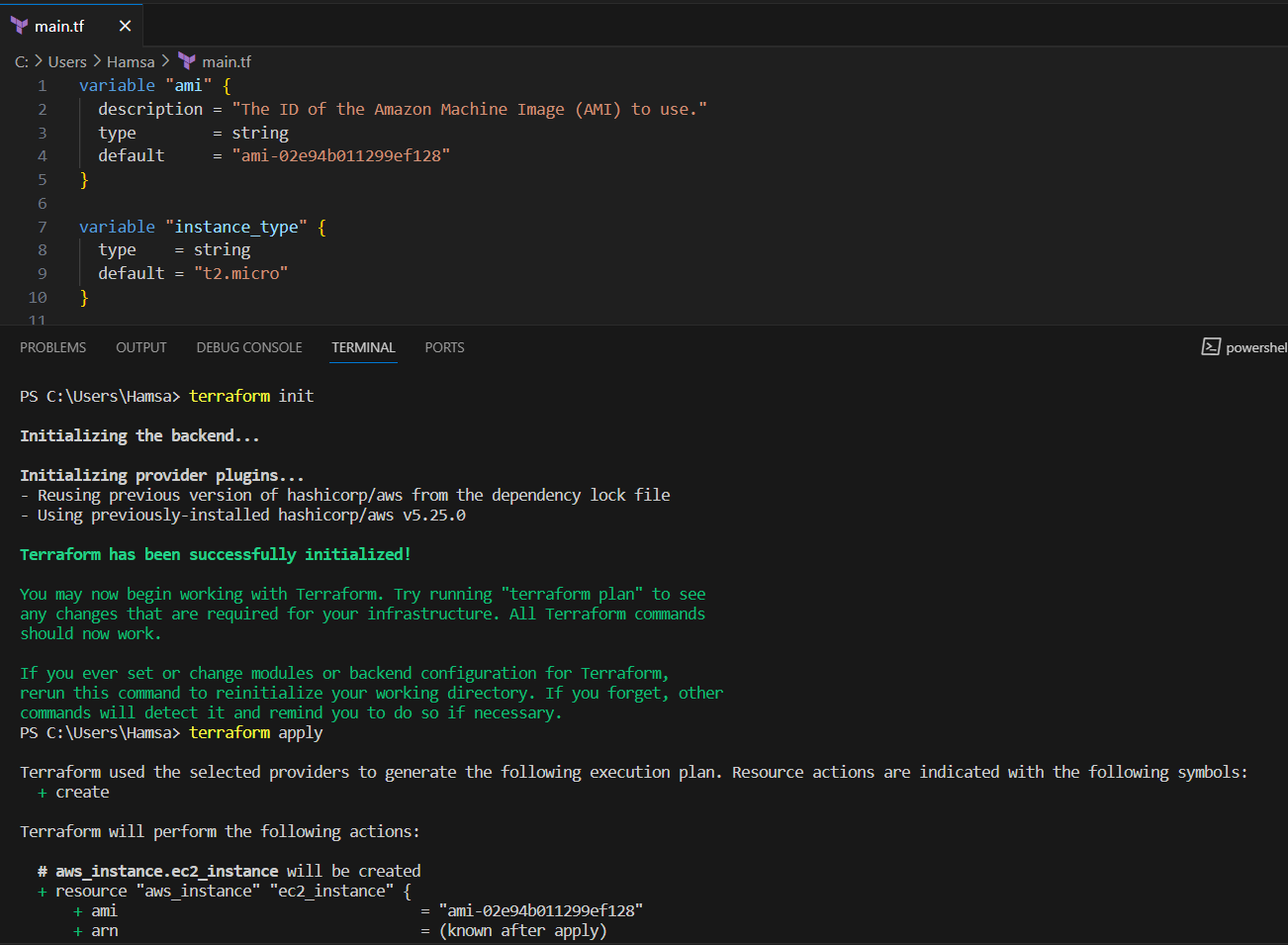
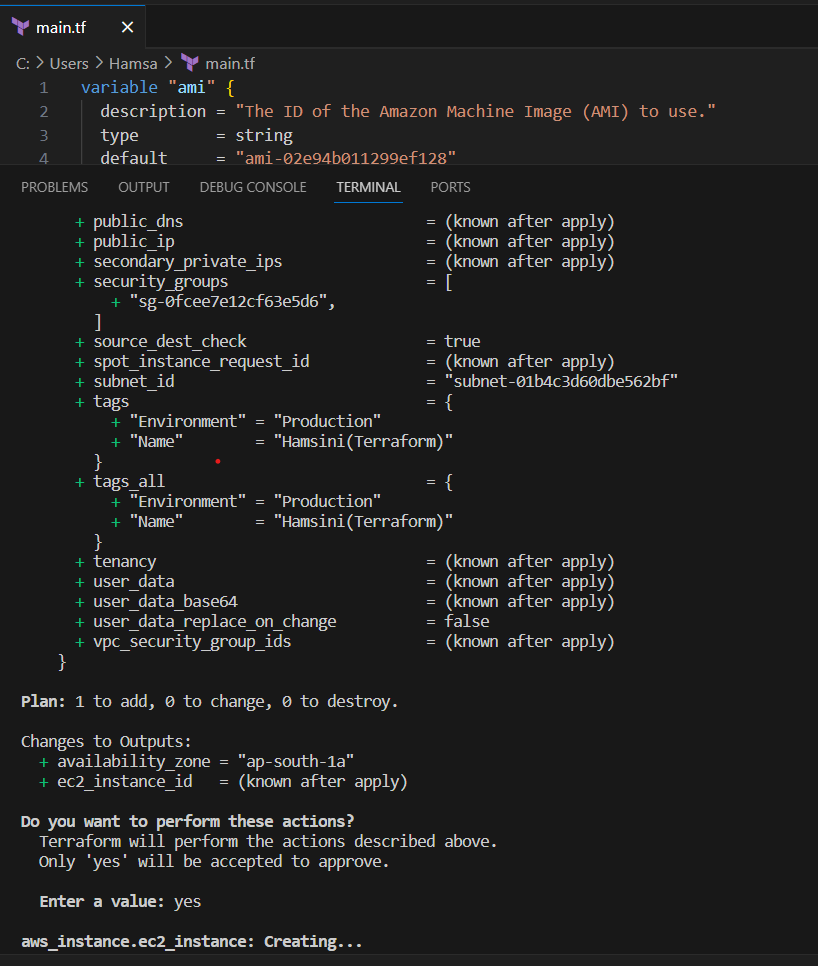
In Terraform, a module is a container for organizing and reusing collections of Terraform resources and configurations. Modules allow you to encapsulate infrastructure components, abstract away complexity, and make your Terraform configurations more modular and maintainable. They are like building blocks that can be reused across different parts of your infrastructure.
Here's how you can create two modules: one for an EC2 instance with an attached EBS volume, and another for a Virtual Private Cloud (VPC) in Terraform.
EC2 and EBS Module:
Create a directory structure for your module.
ec2_ebs_module/
├── main.tf
├── variables.tf
├── outputs.tf
VPC Module:
Create a directory structure for your VPC module.
plaintextCopy codevpc_module/ ├── main.tf ├── variables.tf ├── outputs.tf
- What are terraform tainted resources.
In Terraform, "tainted resources" refer to resources that have been marked for destruction during a subsequent terraform apply operation. Tainting a resource means that Terraform will attempt to destroy and recreate that resource during the next apply, even if there are no changes to its configuration. This can be useful in certain scenarios when you want to forcefully recreate a resource for various reasons, such as troubleshooting, maintenance, or updates.
To taint a resource, you can use the terraform taint command, followed by the resource's address.
After tainting a resource, when you run terraform apply, Terraform will identify the tainted resource and plan to destroy and recreate it. Tainting is a way to ensure that Terraform enforces the recreation of the resource even if there are no changes to its configuration in your Terraform code.
It's important to use tainting carefully, as it can lead to resource downtime or other unintended consequences. Make sure to clearly understand why you need to taint a resource and consider the implications before doing so. Tainting is typically used when other methods, such as updating the resource configuration, are not feasible or practical for achieving the desired state of the infrastructure.
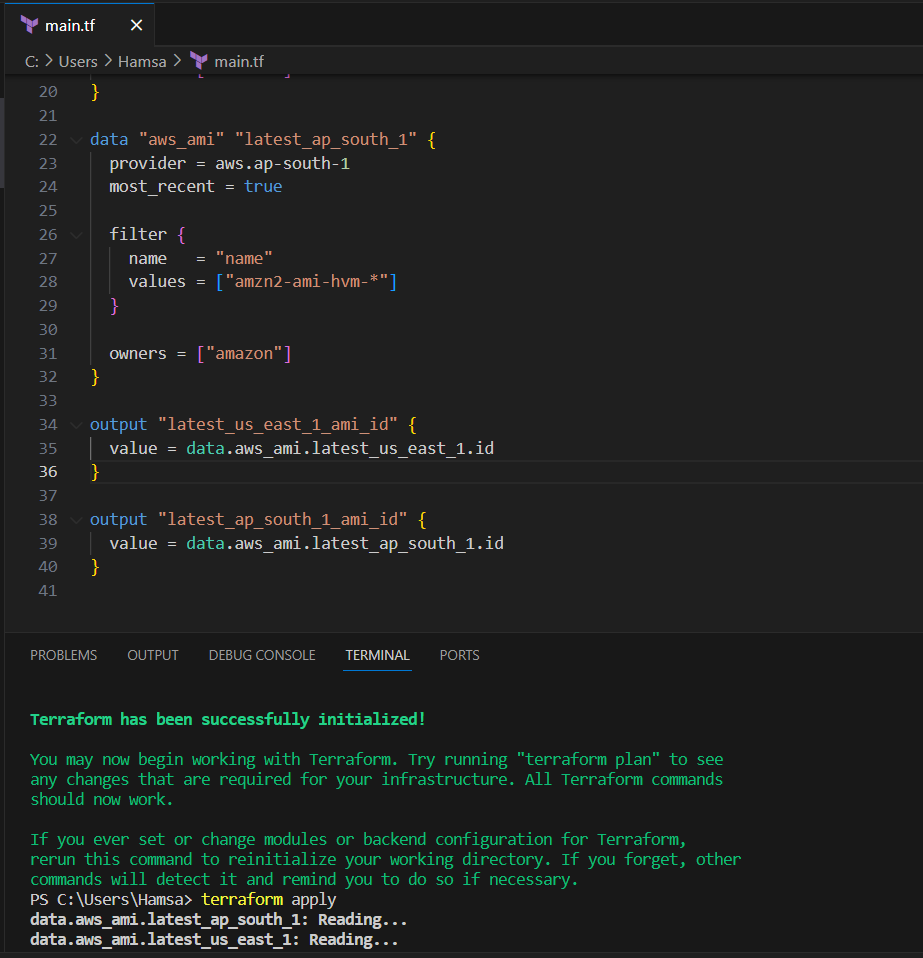
Use data_sources and fetch the latest ami from a region(ap-south-1 and us-east-1).
- Use terraform import to download the remote state file. You can sync the changes from your local to remote state file.
Ex: You can create an EBS volume with 8GB volume using terraform. Now, you modified the volume from 8GB to 12 GB using AWS Console. Now terraform state file is out of sync with your terraform code. Update the terraform state file with new changes that are applied using aws console.
Terraform import is used to import existing resources into the Terraform state, allowing you to manage them using your Terraform configuration. However, Terraform import does not directly download the remote state file, and syncing changes from the AWS Console to your Terraform state requires a slightly different approach. Here's a general procedure to address the scenario you described:
Manually Import the Existing Resource:
Use the terraform import command to import the existing EBS volume into your Terraform state. This assumes that you have already created a Terraform configuration for the EBS volume.
The terraform import command requires the resource address and the actual AWS resource's identifier.
Reconcile Your Configuration:
- After importing the resource, review your Terraform configuration to ensure it matches the actual state of the resource. Update the configuration to reflect the desired state you want Terraform to manage, such as the size change from 8GB to 12GB.
Run terraform apply:
- Apply the changes to your infrastructure by running terraform apply. Terraform will attempt to update the EBS volume to the desired state specified in your configuration.
Syncing Changes from AWS Console:
To keep your Terraform state in sync with changes made via the AWS Console, you have a few options:
Regularly export the state using terraform state pull, and store it in a secure location.
Set up remote state management with a service like Terraform Cloud or an S3 bucket with versioning enabled, so that your state is automatically synchronized.
Consider using a combination of tools and practices to ensure your state is well-maintained, like setting up periodic backups of your Terraform state.
Remember that Terraform import is a one-time operation to bring existing resources under Terraform management. You must also ensure that your Terraform configurations accurately reflect the desired state of your infrastructure. Terraform does not automatically detect or sync external changes made through the AWS Console or other means, so you need to periodically update your configuration to reflect the actual state of your resources.
- What is terragrunt and why is it required.
https://terragrunt.gruntwork.io/docs/getting-started/install/
Terragrunt is an open-source tool created by Gruntwork that acts as a thin wrapper around Terraform, providing extra functionality and enhanced configuration management. Terragrunt simplifies and improves the management of complex Terraform deployments by addressing various challenges and limitations of Terraform itself. Here's why Terragrunt is required and its key features:
Remote State Management:
Terragrunt provides a convenient way to manage remote state configurations. It helps you store and version control Terraform state files in a centralized and organized manner, typically using backend systems like Amazon S3, Google Cloud Storage, or Azure Blob Storage.
Centralized state management reduces the risk of state file corruption, improves collaboration, and simplifies state sharing among team members.
DRY (Don't Repeat Yourself) Configurations:
Terragrunt promotes the DRY principle by enabling code reuse through configuration inheritance. It allows you to define common configurations, such as variables, provider settings, and backend configurations, in a single location and reuse them across multiple Terraform modules or environments.
This reduces code duplication and simplifies the process of managing similar environments with slight variations.
Workspaces and Environment Separation:
Terragrunt supports workspaces, making it easier to manage different environments, such as development, staging, and production, within a single Terraform codebase.
Workspaces help isolate configurations and state files for each environment, ensuring that changes in one environment do not impact others.
Dependencies Management:
- Terragrunt simplifies the management of dependencies between Terraform modules. It enables you to specify module dependencies and enforce a specific order for creating or modifying resources, ensuring that resources are created or modified in the correct sequence.
Secrets Management:
- Terragrunt offers integration with secrets management tools, such as HashiCorp Vault and AWS Secrets Manager, to securely manage sensitive data, like API keys and credentials, within your Terraform configurations.
Enhanced CLI Experience:
- Terragrunt provides a more user-friendly CLI interface, streamlining commands and making it easier to work with Terraform. It offers features like automatic initialization, a unified state management workflow, and a consistent command structure across all Terraform modules.
In summary, Terragrunt enhances Terraform by providing features for remote state management, DRY configurations, environment separation, dependency management, secrets handling, and a more user-friendly CLI experience. These capabilities are particularly beneficial when working on complex, multi-environment infrastructure deployments, and they help streamline infrastructure as code (IaC) development and maintenance. Terragrunt is a valuable tool for teams and organizations that use Terraform for managing their infrastructure.